%20scale(0.1008)'%3e%3cpath%20d='M165-700L80-700L80%200L165%200L165-340L455%200L560%200L242-372L545-700L440-700L165-399L165-700ZM1085-700L685-700L685%200L1085%200L1085-80L770-80L770-340L1065-340L1065-420L770-420L770-620L1085-620L1085-700Z'%20fill='%23FFFFFF'%3e%3c/path%3e%3c/g%3e%3c/svg%3e)
%20scale(0.1008)'%3e%3cpath%20d='M165-700L80-700L80%200L165%200L165-340L455%200L560%200L242-372L545-700L440-700L165-399L165-700ZM1085-700L685-700L685%200L1085%200L1085-80L770-80L770-340L1065-340L1065-420L770-420L770-620L1085-620L1085-700Z'%20fill='%2316294B'%3e%3c/path%3e%3c/g%3e%3c/svg%3e)
'%3e%3cpath%20d='M165-700L80-700L80%200L165%200L165-340L455%200L560%200L242-372L545-700L440-700L165-399L165-700ZM890-700L805-700L805%200L890%200L890-700ZM1825-700L1740-700L1740-179L1210-735L1210%200L1295%200L1295-521L1825%2035L1825-700ZM2545-700L2145-700L2145%200L2545%200L2545-80L2230-80L2230-340L2525-340L2525-420L2230-420L2230-620L2545-620L2545-700ZM2785-700L2785-620L2965-620L2965%200L3050%200L3050-620L3230-620L3230-700L2785-700ZM3565-700L3480-700L3480%200L3565%200L3565-700ZM3935-350L3935-350Q3935-432%203971.500-493.500Q4008-555%204067-590Q4126-625%204195-625L4195-625Q4245-625%204286.500-612Q4328-599%204362-575.500Q4396-552%204420-521L4420-521L4420-633Q4376-672%204324-691Q4272-710%204195-710L4195-710Q4122-710%204058.500-683.500Q3995-657%203947-608.500Q3899-560%203872-494Q3845-428%203845-350L3845-350Q3845-272%203872-206Q3899-140%203947-91.500Q3995-43%204058.500-16.500Q4122%2010%204195%2010L4195%2010Q4272%2010%204324-9Q4376-28%204420-67L4420-67L4420-179Q4396-148%204362-124.500Q4328-101%204286.500-88Q4245-75%204195-75L4195-75Q4126-75%204067-110Q4008-145%203971.500-207Q3935-269%203935-350ZM5590-700L5190-700L5190%200L5590%200L5590-80L5275-80L5275-340L5570-340L5570-420L5275-420L5275-620L5590-620L5590-700ZM6110-700L5900-700L5900%200L6110%200Q6212%200%206291-44Q6370-88%206415-166.500Q6460-245%206460-350Q6460-455%206415-533.500Q6370-612%206291-656Q6212-700%206110-700L6110-700ZM6110-85L5985-85L5985-615L6110-615Q6169-615%206218-596.500Q6267-578%206302-543.500Q6337-509%206356-460Q6375-411%206375-350Q6375-289%206356-240Q6337-191%206302-156.500Q6267-122%206218-103.500Q6169-85%206110-85L6110-85ZM7065-355L7065-275L7298-275Q7289-234%207269.500-198Q7250-162%207220-134Q7190-106%207148.500-90.500Q7107-75%207055-75L7055-75Q6981-75%206921-110Q6861-145%206825.500-207Q6790-269%206790-350L6790-350Q6790-432%206825.500-493.500Q6861-555%206921-590Q6981-625%207055-625L7055-625Q7135-625%207194-593.500Q7253-562%207286-506L7286-506L7346-561Q7316-610%207272.500-643Q7229-676%207174.500-693Q7120-710%207055-710L7055-710Q6979-710%206914-683.500Q6849-657%206801-608.500Q6753-560%206726.500-494Q6700-428%206700-350L6700-350Q6700-272%206726.500-206Q6753-140%206801-91.500Q6849-43%206914-16.500Q6979%2010%207055%2010L7055%2010Q7135%2010%207197.500-19.500Q7260-49%207303-100Q7346-151%207368-216.500Q7390-282%207390-355L7390-355L7065-355ZM8075-700L7675-700L7675%200L8075%200L8075-80L7760-80L7760-340L8055-340L8055-420L7760-420L7760-620L8075-620L8075-700Z'%20fill='%2316294B'%3e%3c/path%3e%3c/g%3e%3c/svg%3e)
'%3e%3cpath%20d='M165-700L80-700L80%200L165%200L165-340L455%200L560%200L242-372L545-700L440-700L165-399L165-700ZM890-700L805-700L805%200L890%200L890-700ZM1825-700L1740-700L1740-179L1210-735L1210%200L1295%200L1295-521L1825%2035L1825-700ZM2545-700L2145-700L2145%200L2545%200L2545-80L2230-80L2230-340L2525-340L2525-420L2230-420L2230-620L2545-620L2545-700ZM2785-700L2785-620L2965-620L2965%200L3050%200L3050-620L3230-620L3230-700L2785-700ZM3565-700L3480-700L3480%200L3565%200L3565-700ZM3935-350L3935-350Q3935-432%203971.500-493.500Q4008-555%204067-590Q4126-625%204195-625L4195-625Q4245-625%204286.500-612Q4328-599%204362-575.500Q4396-552%204420-521L4420-521L4420-633Q4376-672%204324-691Q4272-710%204195-710L4195-710Q4122-710%204058.500-683.500Q3995-657%203947-608.500Q3899-560%203872-494Q3845-428%203845-350L3845-350Q3845-272%203872-206Q3899-140%203947-91.500Q3995-43%204058.500-16.500Q4122%2010%204195%2010L4195%2010Q4272%2010%204324-9Q4376-28%204420-67L4420-67L4420-179Q4396-148%204362-124.500Q4328-101%204286.500-88Q4245-75%204195-75L4195-75Q4126-75%204067-110Q4008-145%203971.500-207Q3935-269%203935-350ZM5590-700L5190-700L5190%200L5590%200L5590-80L5275-80L5275-340L5570-340L5570-420L5275-420L5275-620L5590-620L5590-700ZM6110-700L5900-700L5900%200L6110%200Q6212%200%206291-44Q6370-88%206415-166.500Q6460-245%206460-350Q6460-455%206415-533.500Q6370-612%206291-656Q6212-700%206110-700L6110-700ZM6110-85L5985-85L5985-615L6110-615Q6169-615%206218-596.500Q6267-578%206302-543.500Q6337-509%206356-460Q6375-411%206375-350Q6375-289%206356-240Q6337-191%206302-156.500Q6267-122%206218-103.500Q6169-85%206110-85L6110-85ZM7065-355L7065-275L7298-275Q7289-234%207269.500-198Q7250-162%207220-134Q7190-106%207148.500-90.500Q7107-75%207055-75L7055-75Q6981-75%206921-110Q6861-145%206825.500-207Q6790-269%206790-350L6790-350Q6790-432%206825.500-493.500Q6861-555%206921-590Q6981-625%207055-625L7055-625Q7135-625%207194-593.500Q7253-562%207286-506L7286-506L7346-561Q7316-610%207272.500-643Q7229-676%207174.500-693Q7120-710%207055-710L7055-710Q6979-710%206914-683.500Q6849-657%206801-608.500Q6753-560%206726.500-494Q6700-428%206700-350L6700-350Q6700-272%206726.500-206Q6753-140%206801-91.500Q6849-43%206914-16.500Q6979%2010%207055%2010L7055%2010Q7135%2010%207197.500-19.500Q7260-49%207303-100Q7346-151%207368-216.500Q7390-282%207390-355L7390-355L7065-355ZM8075-700L7675-700L7675%200L8075%200L8075-80L7760-80L7760-340L8055-340L8055-420L7760-420L7760-620L8075-620L8075-700Z'%20fill='%23FFFFFF'%3e%3c/path%3e%3c/g%3e%3c/svg%3e)
Bite Size Streams: Stream-to-Versioned-Table Join
First written March 2026, last updated September 2026.
Versioned tables let a Kafka Streams join behave identically on replay: every stream event joins against the table value as of its own timestamp. The cost is more storage and higher put latency. Here is what that looks like, measured.
Introduction
Versioned tables have the same topology and join syntax as standard tables. We recommend you read the previous article on stream-to-table joins. This article shows how versioned tables provide additional guarantees when building stateful processing.
If you have strict timestamp semantics where the table’s timestamp must be earlier than the stream’s timestamp, versioned tables are the way to go. If you want to replay events and have a 100% guarantee that the joins behave exactly the same, versioned tables are for you. If those guarantees aren't important, continue using non-versioned tables for better performance.
We compared versioned and non-versioned tables. We also looked at how Kafka Streams uses RocksDB and how it configures the changelog topics. Knowing this is important to confirm your application remains performant.
The Demo Application
The demo application used for this article (and all Bite Size Streams articles) emits events from local operating system processes and windows. The demo application adds an iteration attribute to each event, which makes the event ordering easier to understand. The source code is available on GitHub.
Stream-To-Versioned-Table Join Algorithm
This tutorial defines the topology in StreamToVersionedTableJoin. This topology is identical to the stream-to-table join topology. The only difference is that the state store is versioned, which isn't visible in the topology.
Topology
Source Code
Creating the versioned store is the only change you make. The one decision is the retention period: the period of time to retain previous versions. If you need control over how records are stored within RocksDB, an additional duration value is available on the persistentVersionedKeyValueStore method. For the sake of the examples and the demo application, the default segment calculations are used.
protected void build(StreamsBuilder builder) { KTable<String, OSProcess> processes = builder .<String, OSProcess>stream(Constants.PROCESSES) .toTable( Materialized.as( Stores.persistentVersionedKeyValueStore( "processes-store", Duration.ofMinutes(30) // segment size duration can be supplied here ) ) ); builder.<String, OSWindow>stream(Constants.WINDOWS) .selectKey((k, v) -> "" + v.processId()) .join(processes, StreamToVersionedTableJoin::asString) .to(OUTPUT_TOPIC, Produced.with(null, Serdes.String())); } private static String asString(OSWindow w, OSProcess p) { return String.format("pId=%d(%d), wId=%d(%d) %s", p.processId(), p.iteration(), w.windowId(), w.iteration(), rectangleToString(w) ); } private static String rectangleToString(OSWindow w) { return String.format("@%d,%d+%dx%d", w.x(), w.y(), w.width(), w.height()); }Key Implementation Details
- Changelog-topic compaction doesn't occur until the retention period expires.
- The RocksDB key-value store becomes more complex, with potentially multiple entries per key and values that contain more than one record.
Demonstration
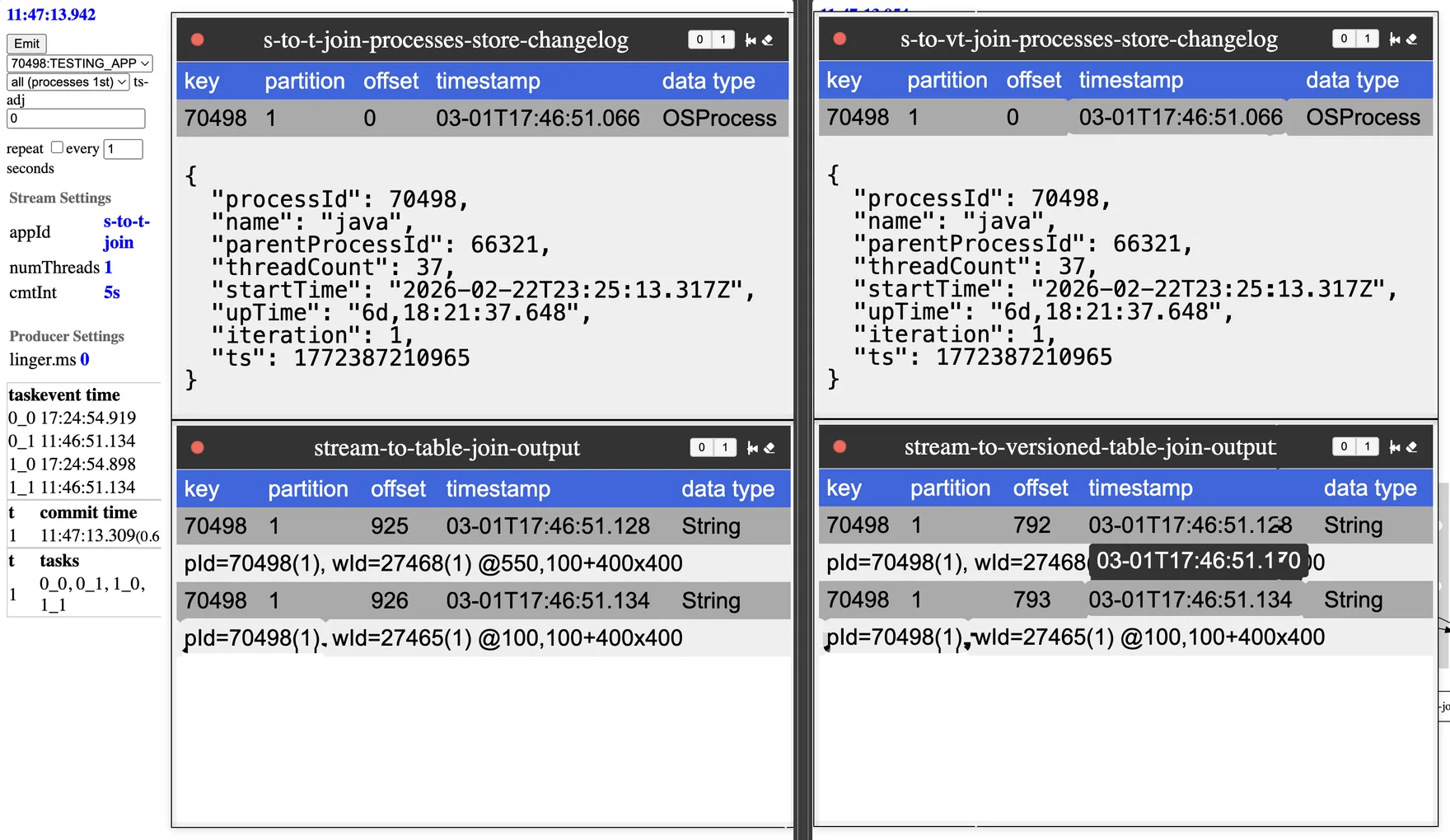
The best way to demonstrate a stream-to-versioned-table join is to compare its behavior to a stream-to-table join. The left side of the diagram is the stream-to-table join, and the right side is the stream-to-versioned-table join.
Scenario 1: Process Events First
In this scenario, whenever the laptop emits a window event and a process event, the process event goes first. The non-versioned and versioned process tables join the same way. Looking closely at the timestamps, the process event is older than the window event, so there is only one version to join against.
Scenario 2: Window Events First
In this scenario, the window events are emitted first. In the non-versioned process table, the join is still with the process from the same iteration. This was explained in the previous bite-size article of stream-to-table joins. In the versioned process table, the process event’s timestamp is used to determine which version of that event is to be joined.
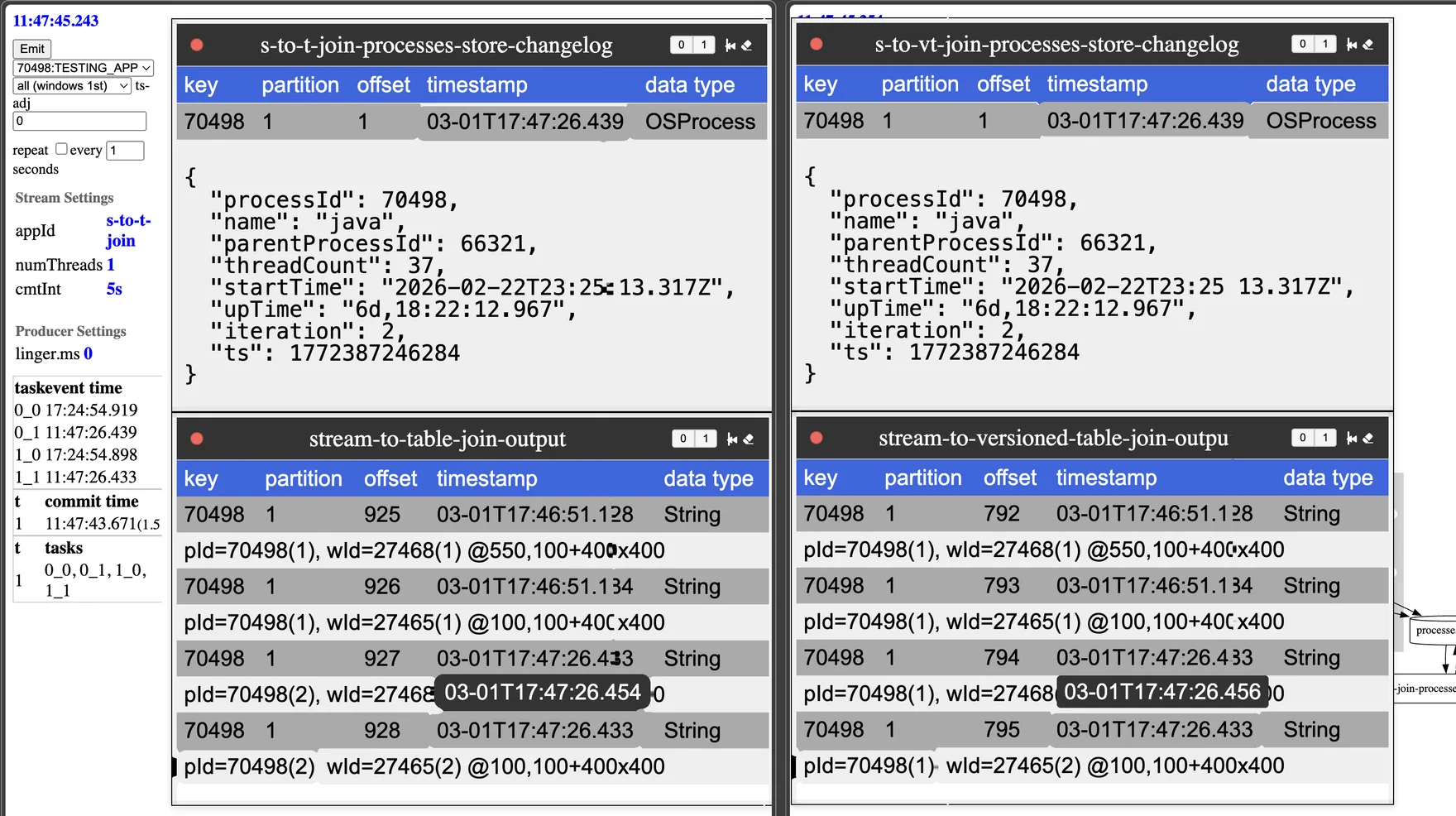
Looking closely at the timestamps, it is clear that the process event is newer than the window event. Even though the event is later (due to the repartition step), the event's timestamp is used to join with the process event that is at that point in time.
In this scenario, the versioned table behaves differently than the standard table. Versioned tables join against the table value as of the stream event's timestamp.
Durability (changelog topic)
How does Kafka Streams manage durability? At first glance it appears complicated; compaction used by changelog topics is only required to maintain the most recent version of a key. There is a Kafka topic configuration to handle this: delayed compaction. Adding a topic configuration of min. ensures compaction doesn't happen during the retention period.
The value that Kafka Streams sets this to is the retention time of the state-store + 24 hours. The 24 hours is hard-coded, but you can change this configuration manually. The additional time keeps restoration and reprocessing possible.
If you describe the versioned changelog topic, you will see the following attributes:
cleanup.policy=compactmin.compaction.lag.ms=88200000 # 24 hours + retention timeDurability of the state-store is implemented with a single Kafka topic configuration. Why is it important to know this implementation detail? The size of this topic can grow large if keys are updated often, even with a short retention span, due to the additional day of retention.
How RocksDB stores versions
Compacted topics aren't queried, so their state is put into a performant key/value store. More than one version of the same key is stored, so how is this implemented? This is done through specialized prefixes added to the keys.
The key gets an additional timestamp-based prefix. This additional long is a “rounded timestamp” called a segment. The length of the segment is determined by the size of the retention period, or provided when calling persistentVersionedKeyValueStore. When determined by retention period, the following rounding algorithm is used. Based on retention time and frequency of updates to a given key, this RocksDB store will have a collection of updates; each update associated with a timestamp. The exception is the current value, which is stored under a special - segment.
This all sounds a little complicated, so a bash script is provided to inspect the RocksDB database to make it easier. The script is available as rocksdb_version_parser, in the repository.
To use this script, you also need to install RocksDB CLI tools; on a Mac, brew is the easiest way to do this. The CLI tool to use is rocksdb_. Make sure your installation version matches the version of RocksDB used by Kafka Streams.
rocksdb_ldb - RocksDB SSTable inspection and hex‑dump utility
To ensure all memtables are flushed, it is best to shut down your Kafka Streams application when using this tool. The rocksdb_ command used against one of the RocksDB state-stores, assuming the kafka- directory is in $TMPDIR (the default location on macOS).
Select the database from your Kafka Streams application state-store and use the following command:
rocksdb_ldb \ --db=$TMPDIR/kafka-streams/s-to-vt-join/0_1/rocksdb/processes-store \ --column_family=default \ --hex scanThe output, in hex form, shows all RocksDB records in this database. Remember, if your topic has multiple partitions, each partition is in a separate database, so check out tasks (e.g. 0_ or 0_) for this demo application.
0x0000000000B44C933730343938 ==> 0x0000019CAC0516FB0000019CAC04D8450000019CAC04EC9B000000E20000019CAC04D845000000E27B225F74797065223A22696F2E6B696E65746963656467652E6B737475746F7269616C2E646F6D61696E2E4F5350726F63657373222C2270726F636573734964223A37303439382C226E616D65223A226A617661222C22706172656E7450726F636573734964223A36363332312C22746872656164436F756E74223A33362C22737461727454696D65223A22323032362D30322D32325432333A32353A31332E3331375A222C22757054696D65223A2237642C30313A32333A33312E313935222C22697465726174696F6E223A312C227473223A313737323431323532343531327D7B225F74797065223A22696F2E6B696E65746963656467652E6B737475746F7269616C2E646F6D61696E2E4F5350726F63657373222C2270726F636573734964223A37303439382C226E616D65223A226A617661222C22706172656E7450726F636573734964223A36363332312C22746872656164436F756E74223A33362C22737461727454696D65223A22323032362D30322D32325432333A32353A31332E3331375A222C22757054696D65223A2237642C30313A32333A33362E333634222C22697465726174696F6E223A322C227473223A313737323431323532393638317D...The scan returns 3 RocksDB records for this key; only the first is shown above. Inspecting the full hexdump, there are 2 records stored in the first row, 3 records in the second row, and 1 record in the third row.
rocksdb_version_parser - decomposing the hexdump
A custom parser is needed to understand the hexdump, rocksdb_version_parser. Inspect the shell-script to fully understand the storage structure of versioned tables.
In this example, the process id of 70498 was updated 6 times over the course of 3 minutes. Timestamps are stored as longs and the display captures the storage pattern. For non-current records, the value starts with min timestamp, max timestamp, and for every record its timestamp and size. Then the values are stored sequentially in reverse order of the timestamp and size list. For the current record (segment=-1), the RocksDB value is just timestamp and state-store value.
Since segment size was calculated by retention time, the parser needs to be provided the retention time, in this case 30 minutes (1,800,000 milliseconds).
command
rocksdb_ldb \ --db=$TMPDIR/kafka-streams/s-to-vt-join/0_1/rocksdb/processes-store \ --column_family=default \ --hex scan | \ ./scripts/rocksdb_version_parser 1800000key=0x0000000000B44C933730343938
**RECORD** rocksdb_key=[segment=11816083, key=70498], [2026-03-01 18:47:30.000 - 2026-03-01 18:49:59.999]NEXT_TS = 2026-03-01 18:49:00.667MIN_TS = 2026-03-01 18:48:44.613[ 0] ts='2026-03-01 18:48:49.819' length=226[ 1] ts='2026-03-01 18:48:44.613' length=226Index entries read: 2Payload starts at hex offset: 80Payload contains 2 values [ 1]{ "_type":"io.kineticedge.kstutorial.domain.OSProcess", "processId":70498, "name":"java", "parentProcessId":66321, "threadCount":36, "startTime":"2026-02-22T23:25:13.317Z", "upTime":"7d,01:23:31.195", "iteration":1, "ts":1772412524512}[ 0]{ "_type":"io.kineticedge.kstutorial.domain.OSProcess", "processId":70498, "name":"java", "parentProcessId":66321, "threadCount":36, "startTime":"2026-02-22T23:25:13.317Z", "upTime":"7d,01:23:36.364", "iteration":2, "ts":1772412529681}key=0x0000000000B44C943730343938
**RECORD** rocksdb_key=[segment=11816084, key=70498], [2026-03-01 18:50:00.000 - 2026-03-01 18:52:29.999]NEXT_TS = 2026-03-01 18:52:00.639MIN_TS = 2026-03-01 18:49:00.667[ 0] ts='2026-03-01 18:51:57.740' length=226[ 1] ts='2026-03-01 18:51:50.327' length=226[ 2] ts='2026-03-01 18:49:00.667' length=226Index entries read: 3Payload starts at hex offset: 104Payload contains 3 values [ 2]{ "_type":"io.kineticedge.kstutorial.domain.OSProcess", "processId":70498, "name":"java", "parentProcessId":66321, "threadCount":36, "startTime":"2026-02-22T23:25:13.317Z", "upTime":"7d,01:23:47.246", "iteration":3, "ts":1772412540563}[ 1]{ "_type":"io.kineticedge.kstutorial.domain.OSProcess", "processId":70498, "name":"java", "parentProcessId":66321, "threadCount":36, "startTime":"2026-02-22T23:25:13.317Z", "upTime":"7d,01:26:36.918", "iteration":4, "ts":1772412710235}[ 0]{ "_type":"io.kineticedge.kstutorial.domain.OSProcess", "processId":70498, "name":"java", "parentProcessId":66321, "threadCount":36, "startTime":"2026-02-22T23:25:13.317Z", "upTime":"7d,01:26:44.326", "iteration":5, "ts":1772412717643}key=0xFFFFFFFFFFFFFFFF3730343938
**RECORD** rocksdb_key=[segment=-1, key=70498]2026-03-01 18:52:00.639{ "_type":"io.kineticedge.kstutorial.domain.OSProcess", "processId":70498, "name":"java", "parentProcessId":66321, "threadCount":36, "startTime":"2026-02-22T23:25:13.317Z", "upTime":"7d,01:26:47.220", "iteration":6, "ts":1772412720537}What is the takeaway here for Kafka Streams developers? Large retention times and frequent updates can lead to large segments. While the storage pattern is designed to minimize deserialization, the marshaling of bytes remains. It's critical to have dashboards on your Kafka Streams metrics, including state stores. Check out the Kafka Streams State Store Dashboard to gain insights into potential dashboards.
RocksDB Performance
To use versioned state stores in Kafka Streams, you don't need to know these details. However, Kafka Streams applications are typically pushing resource limits (performance is a major reason to consider Kafka Streams), so it is important to know what is happening under the hood.
RocksDB Size
As expected, the number of entries in RocksDB is higher. In our testing we've seen up to a 5x increase; at this point in the run it was only 1.5x.
We found using rocksdb_ when the applications were stopped, led to an easier point-in-time comparison than the estimated_ metrics. However, for dashboards, use that metric.
versioned table state store = 23,026
rocksdb_ldb --db=$TMPDIR/kafka-streams/s-to-vt-join/0_0/rocksdb/processes-store --column_family=default --hex scan | wc -l11518rocksdb_ldb --db=$TMPDIR/kafka-streams/s-to-vt-join/0_1/rocksdb/processes-store --column_family=default --hex scan | wc -l11508table state store = 14,870
rocksdb_ldb --db=$TMPDIR/kafka-streams/s-to-t-join/0_0/rocksdb/processes-store --column_family=keyValueWithTimestamp --hex scan | wc -l7454rocksdb_ldb --db=$TMPDIR/kafka-streams/s-to-t-join/0_1/rocksdb/processes-store --column_family=keyValueWithTimestamp --hex scan | wc -l7416This results in over 50% more entries in the versioned table.
Put and Get Latency
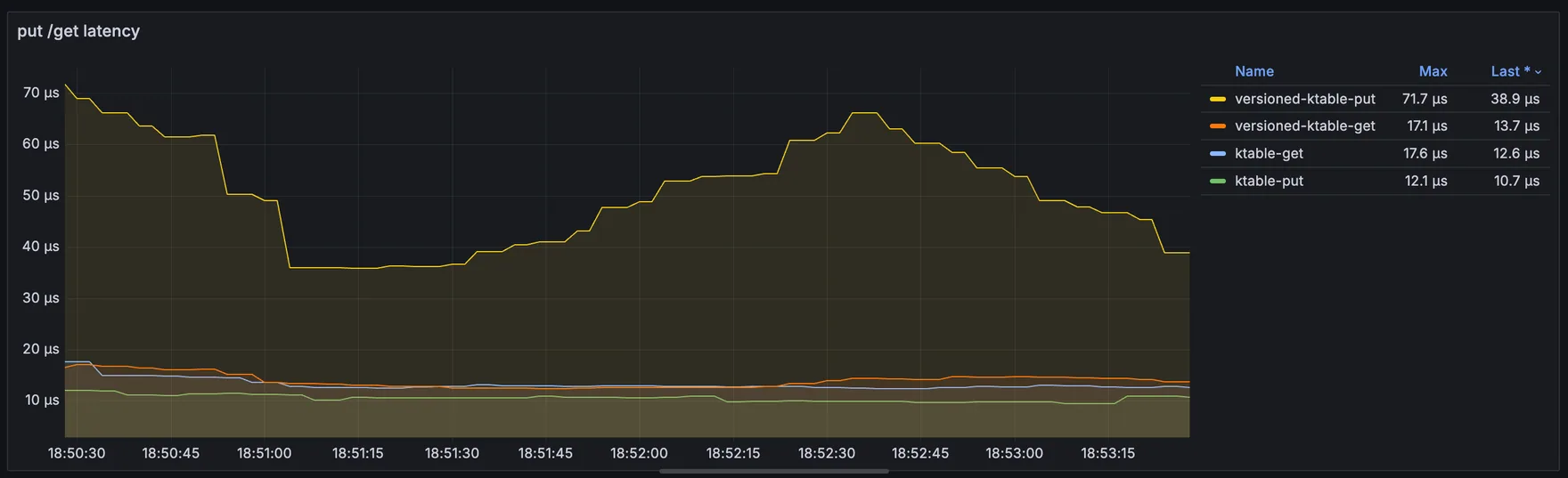
We expected put latency to rise with the extra versions, and it did. Get latency is almost identical to the non-versioned table.
Bytes Read and Written
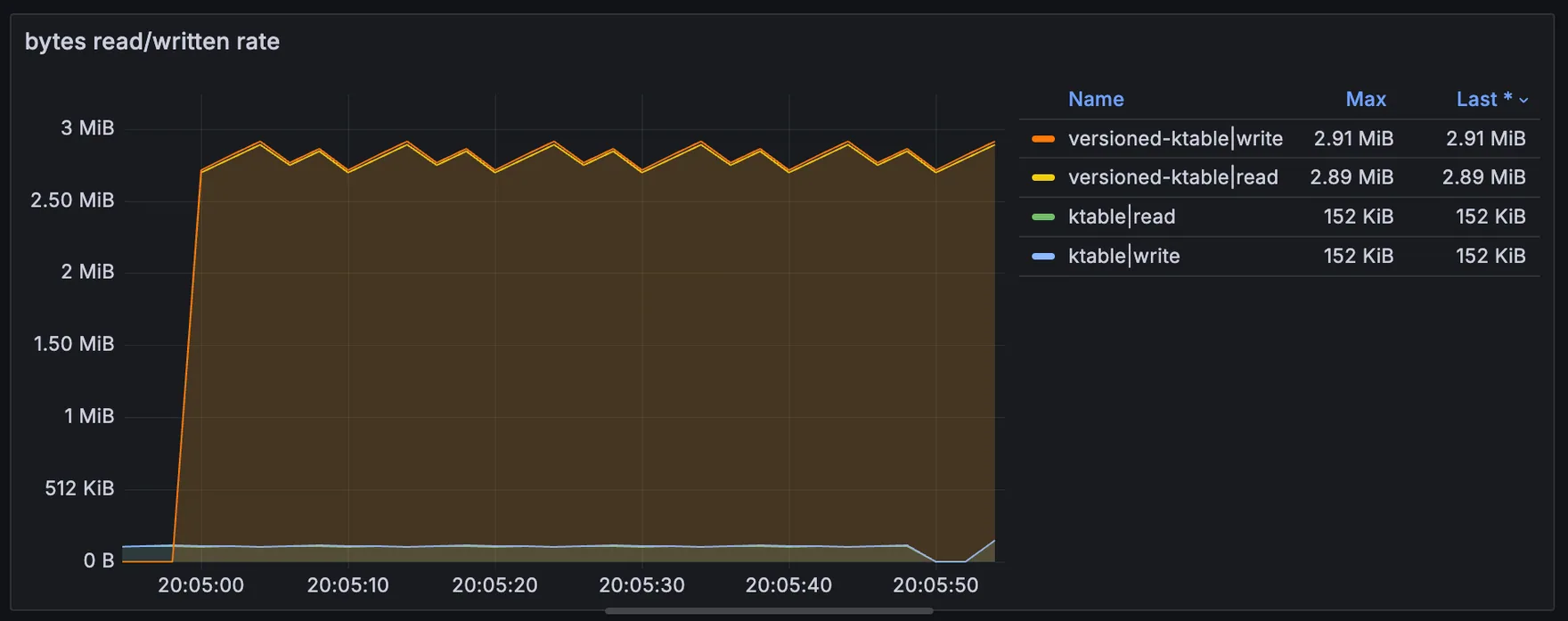
Here are the bytes read and bytes written by the demonstration application emitting events every second. The rate goes from 150KiB to 3MiB, resulting in 20x more bytes read and bytes written every minute.
End-to-End Latency
The end-to-end RocksDB latency metrics are nearly identical, but the version store typically stays a little higher.
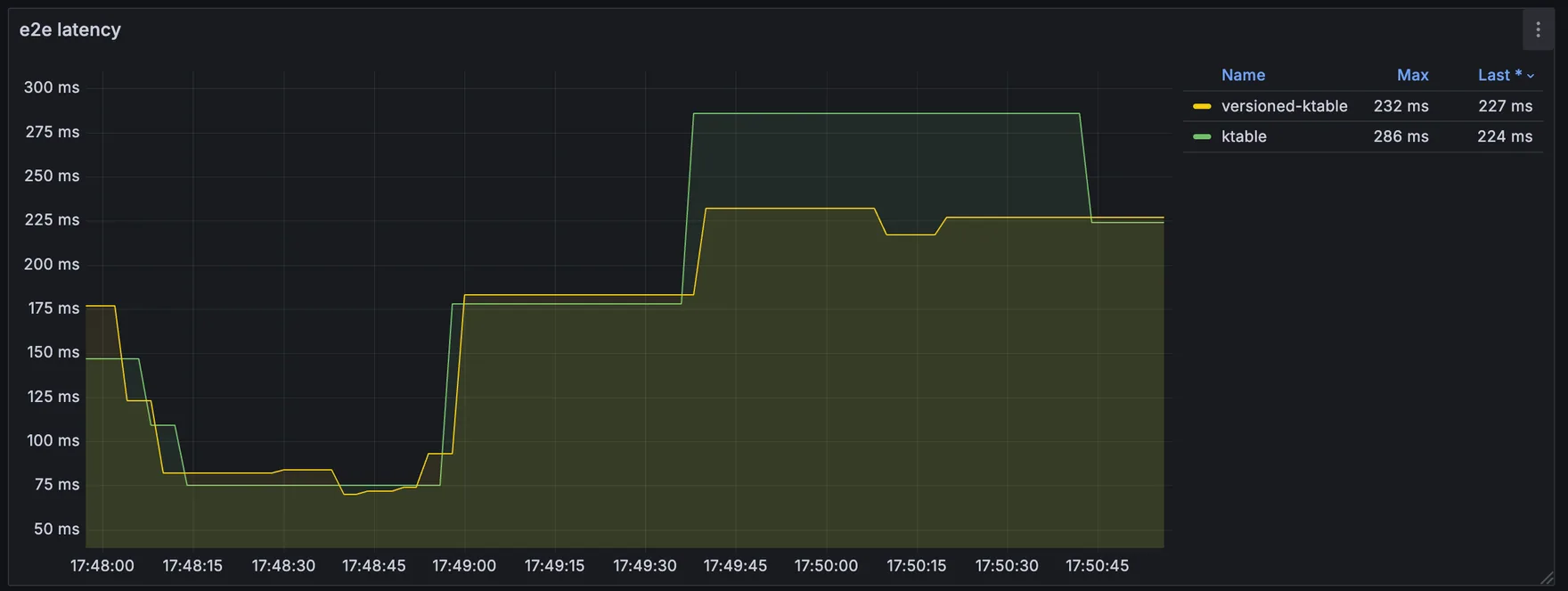
Compaction and flush rates are higher, but that is expected if more bytes exist in the stores.
Shout-out to the Kafka Streams development team for their RocksDB key strategy.
When to use versioned tables
If strict ordering is critical or if you need to replay stream data and confirm it joins to the same table state during reprocessing, versioned state stores are a great option.
Additional Resources
If you want to learn more about the implementation, check out these KIPs: KIP-889 and KIP-914. There is also a great introduction, by Confluent.
Related
Working on something like this?
Start a Conversation