%20scale(0.1008)'%3e%3cpath%20d='M165-700L80-700L80%200L165%200L165-340L455%200L560%200L242-372L545-700L440-700L165-399L165-700ZM1085-700L685-700L685%200L1085%200L1085-80L770-80L770-340L1065-340L1065-420L770-420L770-620L1085-620L1085-700Z'%20fill='%23FFFFFF'%3e%3c/path%3e%3c/g%3e%3c/svg%3e)
%20scale(0.1008)'%3e%3cpath%20d='M165-700L80-700L80%200L165%200L165-340L455%200L560%200L242-372L545-700L440-700L165-399L165-700ZM1085-700L685-700L685%200L1085%200L1085-80L770-80L770-340L1065-340L1065-420L770-420L770-620L1085-620L1085-700Z'%20fill='%2316294B'%3e%3c/path%3e%3c/g%3e%3c/svg%3e)
'%3e%3cpath%20d='M165-700L80-700L80%200L165%200L165-340L455%200L560%200L242-372L545-700L440-700L165-399L165-700ZM890-700L805-700L805%200L890%200L890-700ZM1825-700L1740-700L1740-179L1210-735L1210%200L1295%200L1295-521L1825%2035L1825-700ZM2545-700L2145-700L2145%200L2545%200L2545-80L2230-80L2230-340L2525-340L2525-420L2230-420L2230-620L2545-620L2545-700ZM2785-700L2785-620L2965-620L2965%200L3050%200L3050-620L3230-620L3230-700L2785-700ZM3565-700L3480-700L3480%200L3565%200L3565-700ZM3935-350L3935-350Q3935-432%203971.500-493.500Q4008-555%204067-590Q4126-625%204195-625L4195-625Q4245-625%204286.500-612Q4328-599%204362-575.500Q4396-552%204420-521L4420-521L4420-633Q4376-672%204324-691Q4272-710%204195-710L4195-710Q4122-710%204058.500-683.500Q3995-657%203947-608.500Q3899-560%203872-494Q3845-428%203845-350L3845-350Q3845-272%203872-206Q3899-140%203947-91.500Q3995-43%204058.500-16.500Q4122%2010%204195%2010L4195%2010Q4272%2010%204324-9Q4376-28%204420-67L4420-67L4420-179Q4396-148%204362-124.500Q4328-101%204286.500-88Q4245-75%204195-75L4195-75Q4126-75%204067-110Q4008-145%203971.500-207Q3935-269%203935-350ZM5590-700L5190-700L5190%200L5590%200L5590-80L5275-80L5275-340L5570-340L5570-420L5275-420L5275-620L5590-620L5590-700ZM6110-700L5900-700L5900%200L6110%200Q6212%200%206291-44Q6370-88%206415-166.500Q6460-245%206460-350Q6460-455%206415-533.500Q6370-612%206291-656Q6212-700%206110-700L6110-700ZM6110-85L5985-85L5985-615L6110-615Q6169-615%206218-596.500Q6267-578%206302-543.500Q6337-509%206356-460Q6375-411%206375-350Q6375-289%206356-240Q6337-191%206302-156.500Q6267-122%206218-103.500Q6169-85%206110-85L6110-85ZM7065-355L7065-275L7298-275Q7289-234%207269.500-198Q7250-162%207220-134Q7190-106%207148.500-90.500Q7107-75%207055-75L7055-75Q6981-75%206921-110Q6861-145%206825.500-207Q6790-269%206790-350L6790-350Q6790-432%206825.500-493.500Q6861-555%206921-590Q6981-625%207055-625L7055-625Q7135-625%207194-593.500Q7253-562%207286-506L7286-506L7346-561Q7316-610%207272.500-643Q7229-676%207174.500-693Q7120-710%207055-710L7055-710Q6979-710%206914-683.500Q6849-657%206801-608.500Q6753-560%206726.500-494Q6700-428%206700-350L6700-350Q6700-272%206726.500-206Q6753-140%206801-91.500Q6849-43%206914-16.500Q6979%2010%207055%2010L7055%2010Q7135%2010%207197.500-19.500Q7260-49%207303-100Q7346-151%207368-216.500Q7390-282%207390-355L7390-355L7065-355ZM8075-700L7675-700L7675%200L8075%200L8075-80L7760-80L7760-340L8055-340L8055-420L7760-420L7760-620L8075-620L8075-700Z'%20fill='%2316294B'%3e%3c/path%3e%3c/g%3e%3c/svg%3e)
'%3e%3cpath%20d='M165-700L80-700L80%200L165%200L165-340L455%200L560%200L242-372L545-700L440-700L165-399L165-700ZM890-700L805-700L805%200L890%200L890-700ZM1825-700L1740-700L1740-179L1210-735L1210%200L1295%200L1295-521L1825%2035L1825-700ZM2545-700L2145-700L2145%200L2545%200L2545-80L2230-80L2230-340L2525-340L2525-420L2230-420L2230-620L2545-620L2545-700ZM2785-700L2785-620L2965-620L2965%200L3050%200L3050-620L3230-620L3230-700L2785-700ZM3565-700L3480-700L3480%200L3565%200L3565-700ZM3935-350L3935-350Q3935-432%203971.500-493.500Q4008-555%204067-590Q4126-625%204195-625L4195-625Q4245-625%204286.500-612Q4328-599%204362-575.500Q4396-552%204420-521L4420-521L4420-633Q4376-672%204324-691Q4272-710%204195-710L4195-710Q4122-710%204058.500-683.500Q3995-657%203947-608.500Q3899-560%203872-494Q3845-428%203845-350L3845-350Q3845-272%203872-206Q3899-140%203947-91.500Q3995-43%204058.500-16.500Q4122%2010%204195%2010L4195%2010Q4272%2010%204324-9Q4376-28%204420-67L4420-67L4420-179Q4396-148%204362-124.500Q4328-101%204286.500-88Q4245-75%204195-75L4195-75Q4126-75%204067-110Q4008-145%203971.500-207Q3935-269%203935-350ZM5590-700L5190-700L5190%200L5590%200L5590-80L5275-80L5275-340L5570-340L5570-420L5275-420L5275-620L5590-620L5590-700ZM6110-700L5900-700L5900%200L6110%200Q6212%200%206291-44Q6370-88%206415-166.500Q6460-245%206460-350Q6460-455%206415-533.500Q6370-612%206291-656Q6212-700%206110-700L6110-700ZM6110-85L5985-85L5985-615L6110-615Q6169-615%206218-596.500Q6267-578%206302-543.500Q6337-509%206356-460Q6375-411%206375-350Q6375-289%206356-240Q6337-191%206302-156.500Q6267-122%206218-103.500Q6169-85%206110-85L6110-85ZM7065-355L7065-275L7298-275Q7289-234%207269.500-198Q7250-162%207220-134Q7190-106%207148.500-90.500Q7107-75%207055-75L7055-75Q6981-75%206921-110Q6861-145%206825.500-207Q6790-269%206790-350L6790-350Q6790-432%206825.500-493.500Q6861-555%206921-590Q6981-625%207055-625L7055-625Q7135-625%207194-593.500Q7253-562%207286-506L7286-506L7346-561Q7316-610%207272.500-643Q7229-676%207174.500-693Q7120-710%207055-710L7055-710Q6979-710%206914-683.500Q6849-657%206801-608.500Q6753-560%206726.500-494Q6700-428%206700-350L6700-350Q6700-272%206726.500-206Q6753-140%206801-91.500Q6849-43%206914-16.500Q6979%2010%207055%2010L7055%2010Q7135%2010%207197.500-19.500Q7260-49%207303-100Q7346-151%207368-216.500Q7390-282%207390-355L7390-355L7065-355ZM8075-700L7675-700L7675%200L8075%200L8075-80L7760-80L7760-340L8055-340L8055-420L7760-420L7760-620L8075-620L8075-700Z'%20fill='%23FFFFFF'%3e%3c/path%3e%3c/g%3e%3c/svg%3e)
Bite Size Streams: Stream-to-Table Join
First written February 2026, last updated September 2026.
A stream-to-table join doesn't always join the record you'd expect. Here are three timing scenarios, including one that surprised us.
The Demo Application
The demo emits events from local processes and windows. This mirrors IoT patterns where device IDs repeat.
Events include an iteration sequence number to show which records join.
The demo app inspects the Kafka Streams topology and builds a browser UI with a panel per topic (the screenshots below), so you can watch records move through each step. You can build your own from the tutorials.
The source code is available on GitHub.
Stream-To-Table Join Algorithm
This tutorial defines the topology in StreamToTableJoin.
Steps
toTable- processes are already keyed byprocessId, so Kafka Streams creates the table.selectKey- windows are keyed bywindowId, so they can't be joined to the process table; they must be rekeyed to theprocessId.join- ajoinfollowing aselectKeycreates a-topic and separate sub-topologies; this allows for co-partitioning. The topology shows this.repartition asString- this function has the stream element on the left-hand-side and the table element on the right-hand-side; the output can be any Java object, just make sure it can be properly serialized. In this topology, the actual join is performed by the underlying code of the Kafka Streams DSL. However, you can write topologies where you interact with state stores directly.
Source Code
protected void build(StreamsBuilder builder) { KTable<String, OSProcess> processes = builder .<String, OSProcess>stream(Constants.PROCESSES) .toTable(Materialized.as("processes-store")); builder.<String, OSWindow>stream(Constants.WINDOWS) .selectKey((k, v) -> "" + v.processId()) .join(processes, StreamToTableJoin::asString) .to(OUTPUT_TOPIC, Produced.with(null, Serdes.String())); } private static String asString(OSWindow w, OSProcess p) { return String.format("pId=%d(%d), wId=%d(%d) %s", p.processId(), p.iteration(), w.windowId(), w.iteration(), rectangleToString(w) ); } private static String rectangleToString(OSWindow w) { return String.format("@%d,%d+%dx%d", w.x(), w.y(), w.width(), w.height()); }Stream-To-Table Join Topology
The topology shows how selectKey and join create a separate sub-topology through repartitioning, enabling co-partitioning by processId.
Demonstration
Here are examples of the stream-to-table joins in action.
Happy Path
The system produces events as expected.
windowevents are emitted, iteration=Nprocessevents are emitted, iteration=Nwindowevents are repartitioned to theprocessIdkey- the join occurs with events that are emitted at the same time (iteration)
This example shows one process with two windows creating two enriched records on the output topic. Notice how the partition changes from 1 to 0 as co-partitioning aligns the events.
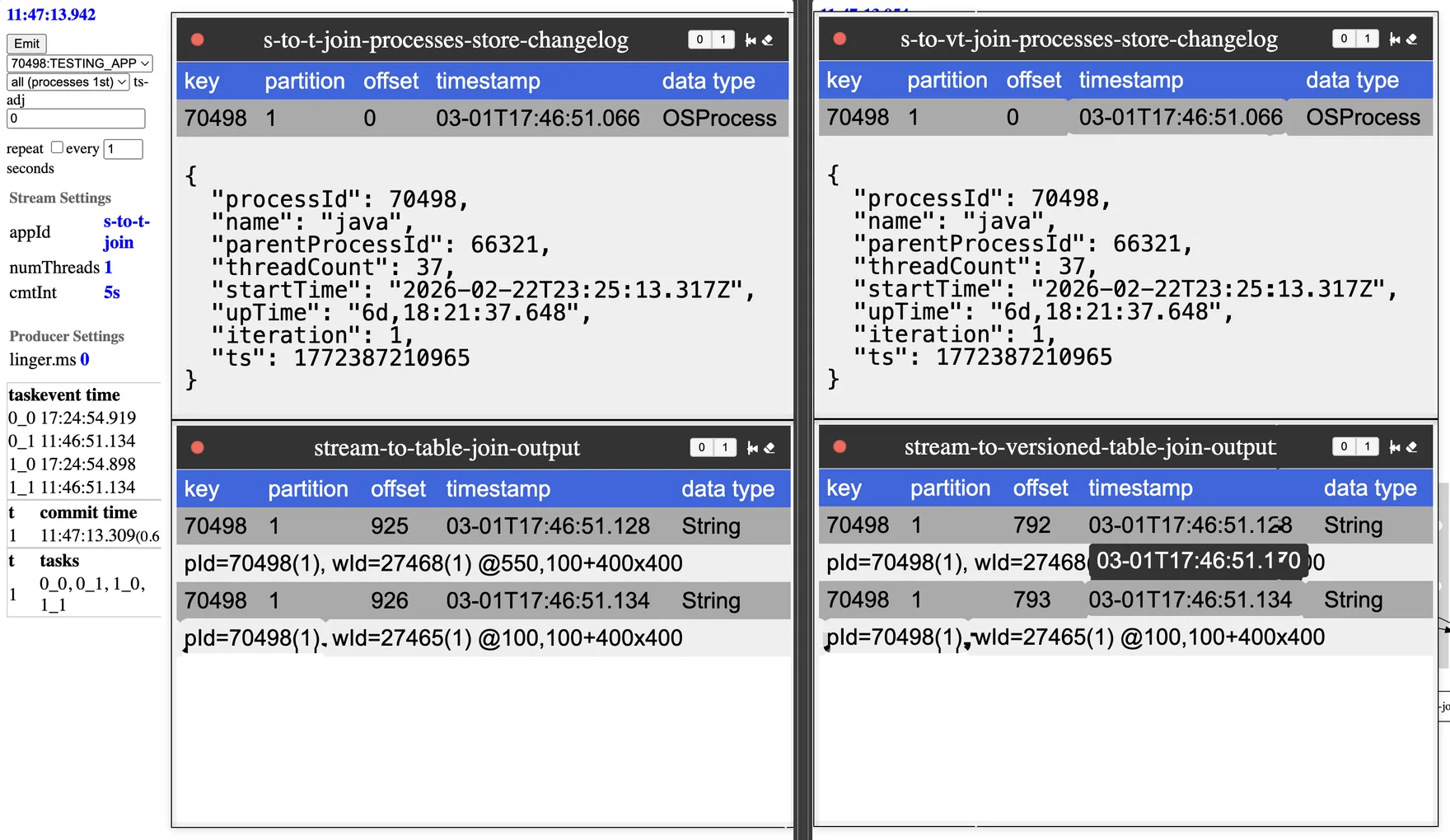
The output dialog shows (iteration) for each of the process and window events to provide a clear indication of which events are joined.
Slightly Late-Arriving Processes
This result surprised us. With window events published (and flushed) prior to publishing process events, one might expect window events to join with process events from the previous publishing, but that isn't the case.
- the app first emitted
windowevents - then the publisher flushed buffers, ensuring the Streams application could process those events before the
processevents arrived - the app then emitted
processevents - the application joined
processandwindowevents - the application joined the
windowevents with the slightly delayedprocessevents from the same iteration
The image highlights the repartition topic’s publishing timestamp, and then shows the result of the join still with the process events from the same iteration.
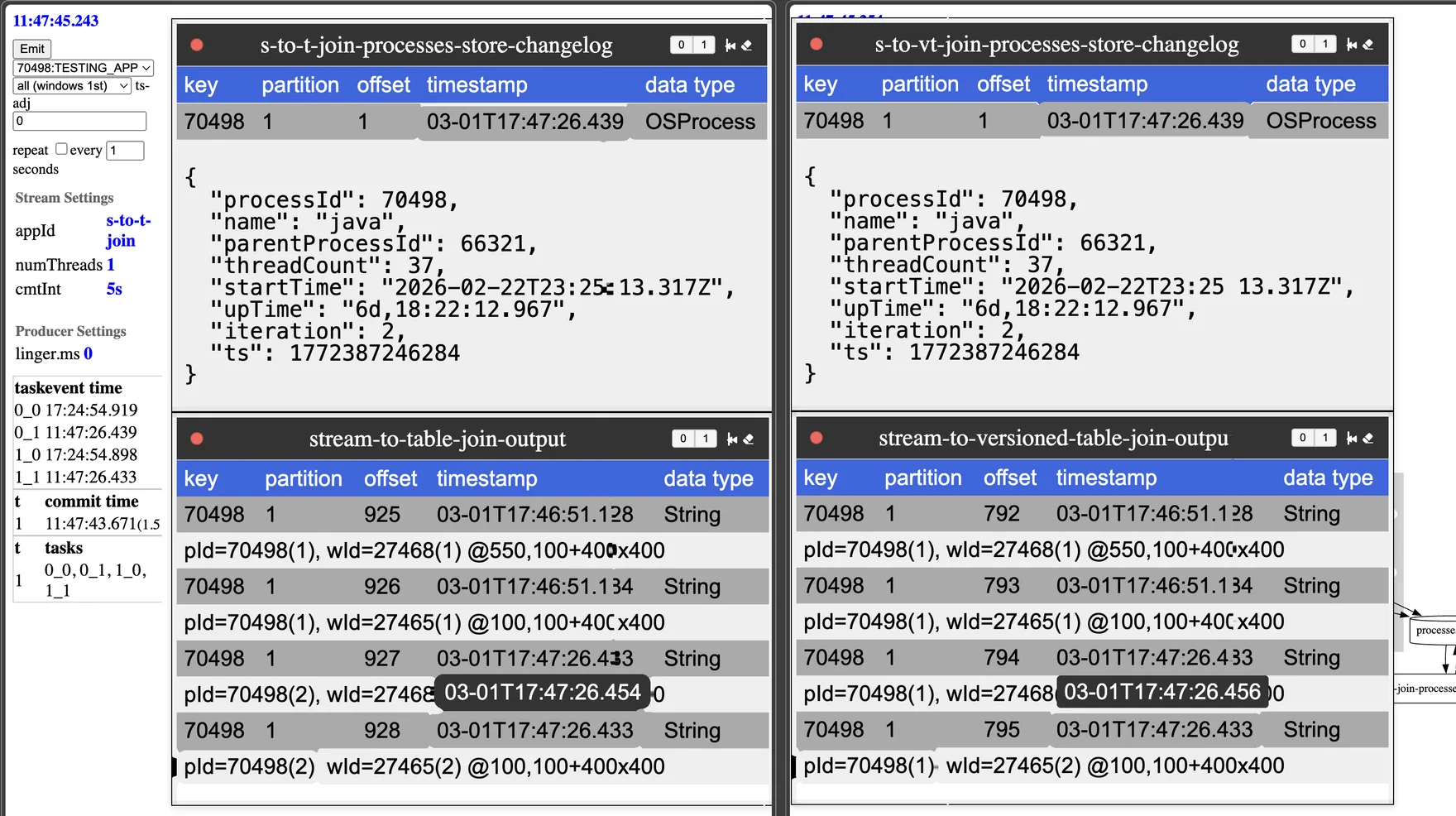
For time semantics to work, Kafka Streams doesn't (by default) change the event’s timestamp. The demo project adds a producer interceptor that adds a header with the publishing timestamp, which the UI displays (the pop-over highlighted on the timestamp of the window events). In this example, the window event arrives 0.001 seconds after the process event. The window event has the earlier timestamp, but the process event reaches the table first, so the join picks it up.
The rule: a regular table updates in the order records arrive, not in timestamp order, and the repartition hop makes the window events arrive late. So the window stream events join with the later-arriving process events.
Later-Arriving Processes
Another scenario occurs where process events arrive after the window events, this time with a slightly longer delay.
windowevents were emitted- publisher flushed buffers
- slight delay occurred
processevents were emitted- joins occurred with
windowevents and earlierprocessevents
This image highlights the expected behavior. Here, the join occurs with the previous iteration of the process event, since the repartitioned window event arrives prior to the process event.
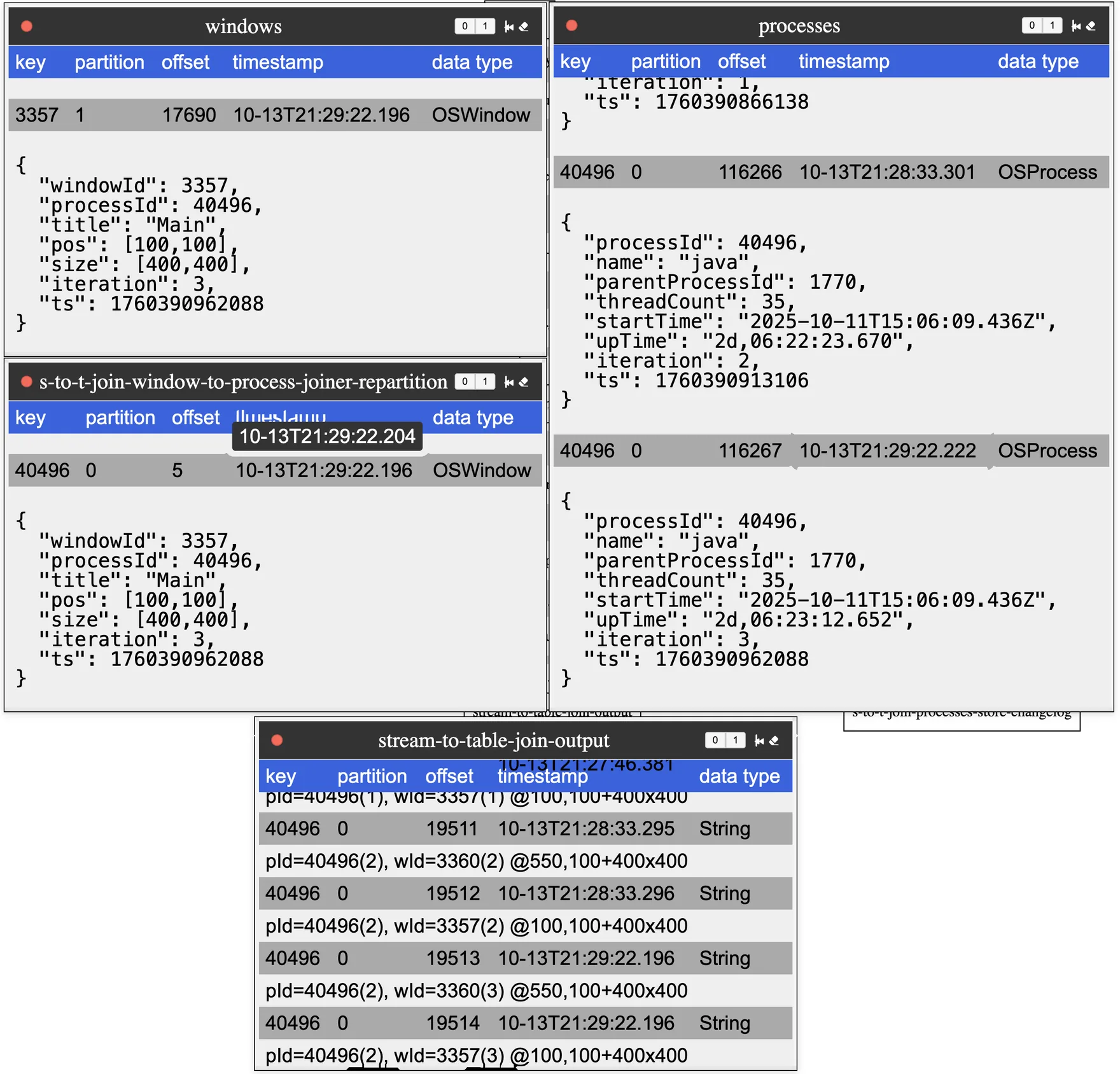
This scenario represents the more expected behavior, where window events with early timestamps join with the previous process events that are already processed. Notice how the timestamp of the repartitioned topic is before the timestamp of the process topic.
When this matters
For most stream-to-table joins, this behavior isn't a concern. The idea is to enrich data with fairly static data, and if that data is slightly more current, it isn't a deal-breaker. However, if your use case can't tolerate this behavior, explore versioned key-value stores, introduced in Kafka 3.5.
Next up: versioned tables, which fix this.
Related
Working on something like this?
Start a Conversation