%20scale(0.1008)'%3e%3cpath%20d='M165-700L80-700L80%200L165%200L165-340L455%200L560%200L242-372L545-700L440-700L165-399L165-700ZM1085-700L685-700L685%200L1085%200L1085-80L770-80L770-340L1065-340L1065-420L770-420L770-620L1085-620L1085-700Z'%20fill='%23FFFFFF'%3e%3c/path%3e%3c/g%3e%3c/svg%3e)
%20scale(0.1008)'%3e%3cpath%20d='M165-700L80-700L80%200L165%200L165-340L455%200L560%200L242-372L545-700L440-700L165-399L165-700ZM1085-700L685-700L685%200L1085%200L1085-80L770-80L770-340L1065-340L1065-420L770-420L770-620L1085-620L1085-700Z'%20fill='%2316294B'%3e%3c/path%3e%3c/g%3e%3c/svg%3e)
'%3e%3cpath%20d='M165-700L80-700L80%200L165%200L165-340L455%200L560%200L242-372L545-700L440-700L165-399L165-700ZM890-700L805-700L805%200L890%200L890-700ZM1825-700L1740-700L1740-179L1210-735L1210%200L1295%200L1295-521L1825%2035L1825-700ZM2545-700L2145-700L2145%200L2545%200L2545-80L2230-80L2230-340L2525-340L2525-420L2230-420L2230-620L2545-620L2545-700ZM2785-700L2785-620L2965-620L2965%200L3050%200L3050-620L3230-620L3230-700L2785-700ZM3565-700L3480-700L3480%200L3565%200L3565-700ZM3935-350L3935-350Q3935-432%203971.500-493.500Q4008-555%204067-590Q4126-625%204195-625L4195-625Q4245-625%204286.500-612Q4328-599%204362-575.500Q4396-552%204420-521L4420-521L4420-633Q4376-672%204324-691Q4272-710%204195-710L4195-710Q4122-710%204058.500-683.500Q3995-657%203947-608.500Q3899-560%203872-494Q3845-428%203845-350L3845-350Q3845-272%203872-206Q3899-140%203947-91.500Q3995-43%204058.500-16.500Q4122%2010%204195%2010L4195%2010Q4272%2010%204324-9Q4376-28%204420-67L4420-67L4420-179Q4396-148%204362-124.500Q4328-101%204286.500-88Q4245-75%204195-75L4195-75Q4126-75%204067-110Q4008-145%203971.500-207Q3935-269%203935-350ZM5590-700L5190-700L5190%200L5590%200L5590-80L5275-80L5275-340L5570-340L5570-420L5275-420L5275-620L5590-620L5590-700ZM6110-700L5900-700L5900%200L6110%200Q6212%200%206291-44Q6370-88%206415-166.500Q6460-245%206460-350Q6460-455%206415-533.500Q6370-612%206291-656Q6212-700%206110-700L6110-700ZM6110-85L5985-85L5985-615L6110-615Q6169-615%206218-596.500Q6267-578%206302-543.500Q6337-509%206356-460Q6375-411%206375-350Q6375-289%206356-240Q6337-191%206302-156.500Q6267-122%206218-103.500Q6169-85%206110-85L6110-85ZM7065-355L7065-275L7298-275Q7289-234%207269.500-198Q7250-162%207220-134Q7190-106%207148.500-90.500Q7107-75%207055-75L7055-75Q6981-75%206921-110Q6861-145%206825.500-207Q6790-269%206790-350L6790-350Q6790-432%206825.500-493.500Q6861-555%206921-590Q6981-625%207055-625L7055-625Q7135-625%207194-593.500Q7253-562%207286-506L7286-506L7346-561Q7316-610%207272.500-643Q7229-676%207174.500-693Q7120-710%207055-710L7055-710Q6979-710%206914-683.500Q6849-657%206801-608.500Q6753-560%206726.500-494Q6700-428%206700-350L6700-350Q6700-272%206726.500-206Q6753-140%206801-91.500Q6849-43%206914-16.500Q6979%2010%207055%2010L7055%2010Q7135%2010%207197.500-19.500Q7260-49%207303-100Q7346-151%207368-216.500Q7390-282%207390-355L7390-355L7065-355ZM8075-700L7675-700L7675%200L8075%200L8075-80L7760-80L7760-340L8055-340L8055-420L7760-420L7760-620L8075-620L8075-700Z'%20fill='%2316294B'%3e%3c/path%3e%3c/g%3e%3c/svg%3e)
'%3e%3cpath%20d='M165-700L80-700L80%200L165%200L165-340L455%200L560%200L242-372L545-700L440-700L165-399L165-700ZM890-700L805-700L805%200L890%200L890-700ZM1825-700L1740-700L1740-179L1210-735L1210%200L1295%200L1295-521L1825%2035L1825-700ZM2545-700L2145-700L2145%200L2545%200L2545-80L2230-80L2230-340L2525-340L2525-420L2230-420L2230-620L2545-620L2545-700ZM2785-700L2785-620L2965-620L2965%200L3050%200L3050-620L3230-620L3230-700L2785-700ZM3565-700L3480-700L3480%200L3565%200L3565-700ZM3935-350L3935-350Q3935-432%203971.500-493.500Q4008-555%204067-590Q4126-625%204195-625L4195-625Q4245-625%204286.500-612Q4328-599%204362-575.500Q4396-552%204420-521L4420-521L4420-633Q4376-672%204324-691Q4272-710%204195-710L4195-710Q4122-710%204058.500-683.500Q3995-657%203947-608.500Q3899-560%203872-494Q3845-428%203845-350L3845-350Q3845-272%203872-206Q3899-140%203947-91.500Q3995-43%204058.500-16.500Q4122%2010%204195%2010L4195%2010Q4272%2010%204324-9Q4376-28%204420-67L4420-67L4420-179Q4396-148%204362-124.500Q4328-101%204286.500-88Q4245-75%204195-75L4195-75Q4126-75%204067-110Q4008-145%203971.500-207Q3935-269%203935-350ZM5590-700L5190-700L5190%200L5590%200L5590-80L5275-80L5275-340L5570-340L5570-420L5275-420L5275-620L5590-620L5590-700ZM6110-700L5900-700L5900%200L6110%200Q6212%200%206291-44Q6370-88%206415-166.500Q6460-245%206460-350Q6460-455%206415-533.500Q6370-612%206291-656Q6212-700%206110-700L6110-700ZM6110-85L5985-85L5985-615L6110-615Q6169-615%206218-596.500Q6267-578%206302-543.500Q6337-509%206356-460Q6375-411%206375-350Q6375-289%206356-240Q6337-191%206302-156.500Q6267-122%206218-103.500Q6169-85%206110-85L6110-85ZM7065-355L7065-275L7298-275Q7289-234%207269.500-198Q7250-162%207220-134Q7190-106%207148.500-90.500Q7107-75%207055-75L7055-75Q6981-75%206921-110Q6861-145%206825.500-207Q6790-269%206790-350L6790-350Q6790-432%206825.500-493.500Q6861-555%206921-590Q6981-625%207055-625L7055-625Q7135-625%207194-593.500Q7253-562%207286-506L7286-506L7346-561Q7316-610%207272.500-643Q7229-676%207174.500-693Q7120-710%207055-710L7055-710Q6979-710%206914-683.500Q6849-657%206801-608.500Q6753-560%206726.500-494Q6700-428%206700-350L6700-350Q6700-272%206726.500-206Q6753-140%206801-91.500Q6849-43%206914-16.500Q6979%2010%207055%2010L7055%2010Q7135%2010%207197.500-19.500Q7260-49%207303-100Q7346-151%207368-216.500Q7390-282%207390-355L7390-355L7065-355ZM8075-700L7675-700L7675%200L8075%200L8075-80L7760-80L7760-340L8055-340L8055-420L7760-420L7760-620L8075-620L8075-700Z'%20fill='%23FFFFFF'%3e%3c/path%3e%3c/g%3e%3c/svg%3e)
Druid on Apple Silicon
First written September 2022, last updated September 2026.
The published Apache Druid container on Docker Hub is a linux/amd64-only image. Running this on Apple silicon is slow.
Fortunately, it is easy to build your own using the binary distribution and the existing druid.sh.
All of this is available in a Dockerfile and build script in the druid-m1 repository. The build. builds an arm64 image based on the version to be downloaded in the Dockerfile.
A linux/ container-based deployment of Apache Druid on Apple silicon takes 2 minutes (1:58.58, measured on an M1 Max with 64GB memory and 32GB allocated to Docker) to start and become available for processing. An image built from linux/ base images takes only 18 seconds (0:17.79) to become available.
If you just need an arm64/v8 image, download the druid-m1 project and run the build. script. Want to know a little about how it was put together? Continue on.
Updates
Updated to support Druid 30. The container is now based on a Java 17 image. The distribution layout also changed, which required further updates. The result aligns closely with Druid’s standard Dockerfile.
Image
The process of creating this image isn’t complicated. Three major pieces went into its creation.
OS Architecture
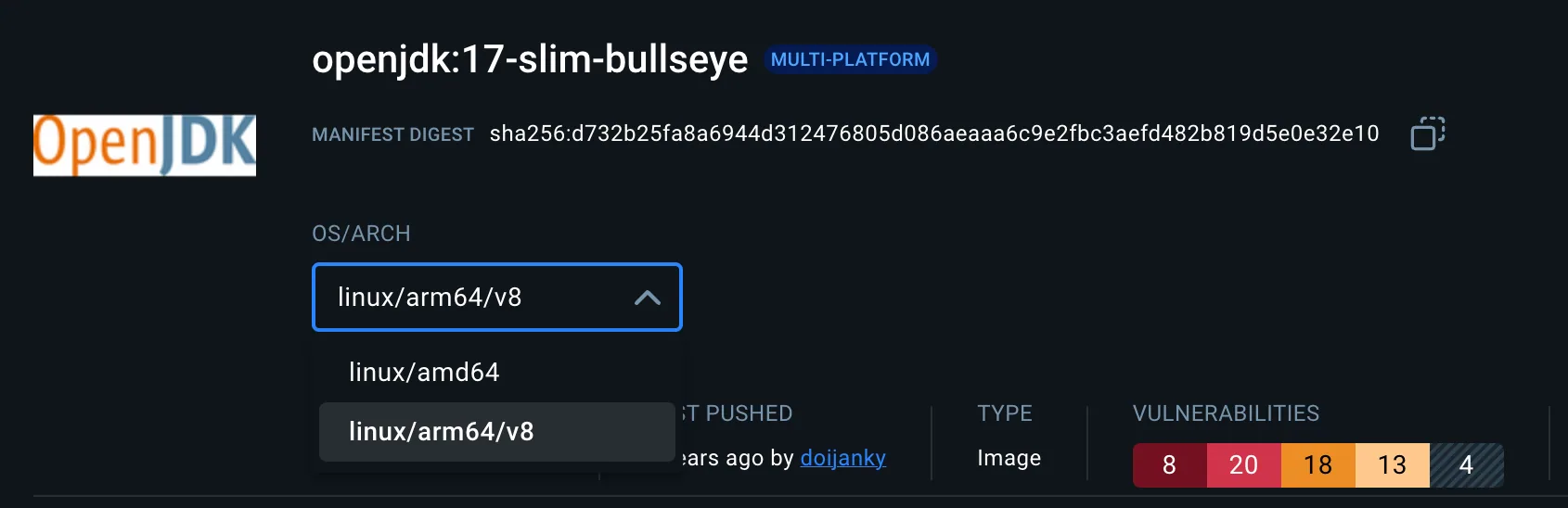
First find and use containers that have an arm64/v8 image. Both “openjdk:17-slim-bullseye” and “busybox” have arm64/v8 images.
Software Installation
The Dockerfile downloads and installs Druid, and uses the druid. maintained by Apache Druid.
ARG DRUID_VERSION=30.0.1ADD https://archive.apache.org/dist/druid/${DRUID_VERSION}/apache-druid-${DRUID_VERSION}-bin.tar.gz /tmpADD https://raw.githubusercontent.com/apache/druid/${DRUID_VERSION}/distribution/docker/druid.sh /druid.shDruid Extensions
Druid extensions are added by the pull- operation available with Druid. For this build, the kafka- extension is included, but others are easy to add.
RUN \ java -cp "/opt/druid/lib/*" \ -Ddruid.extensions.directory="/opt/druid/extensions/" \ -Ddruid.extensions.hadoopDependenciesDir="/opt/druid/hadoop-dependencies/" \ org.apache.druid.cli.Main tools pull-deps --no-default-hadoop \ -c "org.apache.druid.extensions.contrib:kafka-emitter"Why The Difference?
The Dockerfile that is part of Apache Druid builds the software from source. Since this image is built after a release, this approach uses the fact that the binaries are available for download.
New To Druid?
If you are new to Druid and want to see what it can do, check out the druid- demonstration within dev-local-demos. It uses a container-based toolkit provided at dev-local. Update the . file within the druid folder to point to your individually built arm64 image.
Working on something like this?
Start a Conversation