%20scale(0.1008)'%3e%3cpath%20d='M165-700L80-700L80%200L165%200L165-340L455%200L560%200L242-372L545-700L440-700L165-399L165-700ZM1085-700L685-700L685%200L1085%200L1085-80L770-80L770-340L1065-340L1065-420L770-420L770-620L1085-620L1085-700Z'%20fill='%23FFFFFF'%3e%3c/path%3e%3c/g%3e%3c/svg%3e)
%20scale(0.1008)'%3e%3cpath%20d='M165-700L80-700L80%200L165%200L165-340L455%200L560%200L242-372L545-700L440-700L165-399L165-700ZM1085-700L685-700L685%200L1085%200L1085-80L770-80L770-340L1065-340L1065-420L770-420L770-620L1085-620L1085-700Z'%20fill='%2316294B'%3e%3c/path%3e%3c/g%3e%3c/svg%3e)
'%3e%3cpath%20d='M165-700L80-700L80%200L165%200L165-340L455%200L560%200L242-372L545-700L440-700L165-399L165-700ZM890-700L805-700L805%200L890%200L890-700ZM1825-700L1740-700L1740-179L1210-735L1210%200L1295%200L1295-521L1825%2035L1825-700ZM2545-700L2145-700L2145%200L2545%200L2545-80L2230-80L2230-340L2525-340L2525-420L2230-420L2230-620L2545-620L2545-700ZM2785-700L2785-620L2965-620L2965%200L3050%200L3050-620L3230-620L3230-700L2785-700ZM3565-700L3480-700L3480%200L3565%200L3565-700ZM3935-350L3935-350Q3935-432%203971.500-493.500Q4008-555%204067-590Q4126-625%204195-625L4195-625Q4245-625%204286.500-612Q4328-599%204362-575.500Q4396-552%204420-521L4420-521L4420-633Q4376-672%204324-691Q4272-710%204195-710L4195-710Q4122-710%204058.500-683.500Q3995-657%203947-608.500Q3899-560%203872-494Q3845-428%203845-350L3845-350Q3845-272%203872-206Q3899-140%203947-91.500Q3995-43%204058.500-16.500Q4122%2010%204195%2010L4195%2010Q4272%2010%204324-9Q4376-28%204420-67L4420-67L4420-179Q4396-148%204362-124.500Q4328-101%204286.500-88Q4245-75%204195-75L4195-75Q4126-75%204067-110Q4008-145%203971.500-207Q3935-269%203935-350ZM5590-700L5190-700L5190%200L5590%200L5590-80L5275-80L5275-340L5570-340L5570-420L5275-420L5275-620L5590-620L5590-700ZM6110-700L5900-700L5900%200L6110%200Q6212%200%206291-44Q6370-88%206415-166.500Q6460-245%206460-350Q6460-455%206415-533.500Q6370-612%206291-656Q6212-700%206110-700L6110-700ZM6110-85L5985-85L5985-615L6110-615Q6169-615%206218-596.500Q6267-578%206302-543.500Q6337-509%206356-460Q6375-411%206375-350Q6375-289%206356-240Q6337-191%206302-156.500Q6267-122%206218-103.500Q6169-85%206110-85L6110-85ZM7065-355L7065-275L7298-275Q7289-234%207269.500-198Q7250-162%207220-134Q7190-106%207148.500-90.500Q7107-75%207055-75L7055-75Q6981-75%206921-110Q6861-145%206825.500-207Q6790-269%206790-350L6790-350Q6790-432%206825.500-493.500Q6861-555%206921-590Q6981-625%207055-625L7055-625Q7135-625%207194-593.500Q7253-562%207286-506L7286-506L7346-561Q7316-610%207272.500-643Q7229-676%207174.500-693Q7120-710%207055-710L7055-710Q6979-710%206914-683.500Q6849-657%206801-608.500Q6753-560%206726.500-494Q6700-428%206700-350L6700-350Q6700-272%206726.500-206Q6753-140%206801-91.500Q6849-43%206914-16.500Q6979%2010%207055%2010L7055%2010Q7135%2010%207197.500-19.500Q7260-49%207303-100Q7346-151%207368-216.500Q7390-282%207390-355L7390-355L7065-355ZM8075-700L7675-700L7675%200L8075%200L8075-80L7760-80L7760-340L8055-340L8055-420L7760-420L7760-620L8075-620L8075-700Z'%20fill='%2316294B'%3e%3c/path%3e%3c/g%3e%3c/svg%3e)
'%3e%3cpath%20d='M165-700L80-700L80%200L165%200L165-340L455%200L560%200L242-372L545-700L440-700L165-399L165-700ZM890-700L805-700L805%200L890%200L890-700ZM1825-700L1740-700L1740-179L1210-735L1210%200L1295%200L1295-521L1825%2035L1825-700ZM2545-700L2145-700L2145%200L2545%200L2545-80L2230-80L2230-340L2525-340L2525-420L2230-420L2230-620L2545-620L2545-700ZM2785-700L2785-620L2965-620L2965%200L3050%200L3050-620L3230-620L3230-700L2785-700ZM3565-700L3480-700L3480%200L3565%200L3565-700ZM3935-350L3935-350Q3935-432%203971.500-493.500Q4008-555%204067-590Q4126-625%204195-625L4195-625Q4245-625%204286.500-612Q4328-599%204362-575.500Q4396-552%204420-521L4420-521L4420-633Q4376-672%204324-691Q4272-710%204195-710L4195-710Q4122-710%204058.500-683.500Q3995-657%203947-608.500Q3899-560%203872-494Q3845-428%203845-350L3845-350Q3845-272%203872-206Q3899-140%203947-91.500Q3995-43%204058.500-16.500Q4122%2010%204195%2010L4195%2010Q4272%2010%204324-9Q4376-28%204420-67L4420-67L4420-179Q4396-148%204362-124.500Q4328-101%204286.500-88Q4245-75%204195-75L4195-75Q4126-75%204067-110Q4008-145%203971.500-207Q3935-269%203935-350ZM5590-700L5190-700L5190%200L5590%200L5590-80L5275-80L5275-340L5570-340L5570-420L5275-420L5275-620L5590-620L5590-700ZM6110-700L5900-700L5900%200L6110%200Q6212%200%206291-44Q6370-88%206415-166.500Q6460-245%206460-350Q6460-455%206415-533.500Q6370-612%206291-656Q6212-700%206110-700L6110-700ZM6110-85L5985-85L5985-615L6110-615Q6169-615%206218-596.500Q6267-578%206302-543.500Q6337-509%206356-460Q6375-411%206375-350Q6375-289%206356-240Q6337-191%206302-156.500Q6267-122%206218-103.500Q6169-85%206110-85L6110-85ZM7065-355L7065-275L7298-275Q7289-234%207269.500-198Q7250-162%207220-134Q7190-106%207148.500-90.500Q7107-75%207055-75L7055-75Q6981-75%206921-110Q6861-145%206825.500-207Q6790-269%206790-350L6790-350Q6790-432%206825.500-493.500Q6861-555%206921-590Q6981-625%207055-625L7055-625Q7135-625%207194-593.500Q7253-562%207286-506L7286-506L7346-561Q7316-610%207272.500-643Q7229-676%207174.500-693Q7120-710%207055-710L7055-710Q6979-710%206914-683.500Q6849-657%206801-608.500Q6753-560%206726.500-494Q6700-428%206700-350L6700-350Q6700-272%206726.500-206Q6753-140%206801-91.500Q6849-43%206914-16.500Q6979%2010%207055%2010L7055%2010Q7135%2010%207197.500-19.500Q7260-49%207303-100Q7346-151%207368-216.500Q7390-282%207390-355L7390-355L7065-355ZM8075-700L7675-700L7675%200L8075%200L8075-80L7760-80L7760-340L8055-340L8055-420L7760-420L7760-620L8075-620L8075-700Z'%20fill='%23FFFFFF'%3e%3c/path%3e%3c/g%3e%3c/svg%3e)
CDC with Kafka Connect and Debezium
First written August 2022, last updated September 2026.
Setting up change data capture with databases, Apache Kafka, Kafka Connect, and Debezium takes time, with tricky configuration along the way. Here we'll walk through a setup of all components to show what is possible and give you the pieces to bring this into your project.
Real-Time Toolkit
This demo is available in the rdbms-cdc-nosql folder of the dev-local-demos project. It uses applications available through containers in dev-local. Within a few minutes, you can see change data capture from relational databases (Postgres, MySQL v8, and MySQL v5) into NoSQL data stores (Mongo, Cassandra, and Elasticsearch). Stream enrichment processing is done with ksqlDB.
Challenges
The specific touch-points covered here:
- Enabling logging within a database
- Connector setting nuances
- Management of Kafka Connect Secrets
- Logical Data-types
Database logging
Each database has its own nuances to set up logging. This is critical for any change data capture process, and something that needs to be well understood for success. Here are the settings and issues in the configuration of Postgres and MySQL with Debezium for change data capture. This isn't a complete overview of all the settings, but rather insight into the complexities your database operations and development teams need to work through together. Work with your database administrators to enable database logging on the tables that are needed, along with any snapshotting or specific configurations.
Postgres and Debezium
TL;DR
wal_must be set tolevel logical.- If you are running Postgres with docker compose, override the command with the following:
command: "postgres -c wal_level=logical"- The connector needs to enable the
pgoutputplugin. - Add the following to the connector configuration:
"plugin.name" : "pgoutput"Details
Postgres needs to be able to capture changes; this is done through the write-ahead log (WAL).
The amount of data captured is based on the wal_ settings. The default setting is replica, but that is an insufficient level of data for Debezium. The logical setting includes replica information and additional logical change sets.
Debezium has to be configured to use the pgoutput plugin. Use the configuration property plugin. to set this.
Troubleshooting
This is a set of errors seen when using Debezium Postgres Source Connector.
- Attempting to start Debezium with Postgres, without
wal_properly defined.level
Connector configuration is invalid and contains the following 1 error(s): Postgres server wal_level property must be "logical" but is: replica- Restarting Postgres without
-will result in Postgres failing to start with the following error:c wal_ level=logical
FATAL: logical replication slot "debezium" exists, but wal_level < logical- Starting a connector without
pgoutputplugin enabled.
io.debezium.DebeziumException: Creation of replication slot failedIf (we should say when) you uncover an error, take the time to document it well. A déjà-vu moment when an error resurfaces isn't fun.
MySQL (v8) and Debezium
TL;DR
MySQL 8 has logging enabled by default. In production, however, you do need to verify this with operations.
Troubleshooting
You delete and recreate your MySQL database, but reuse the connector (and the state it persists in Kafka):
Caused by: io.debezium.DebeziumException:Client requested master to start replication from position > file size Error code: 1236; SQLSTATE: HY000MySQL 5 (legacy)
MySQL 5.7 reached end of life in October 2023. If you still run it, the binlog isn't enabled by default: set log_, set binlog_ to row, and keep expire_ longer than any reprocessing window. The replication-position error above applies to MySQL 5 as well, and a shutdown or unreachable server surfaces as Failed to read next byte from position.
Debezium
Debezium is an excellent open-source change data capture product. It provides a lot of features that make it a powerful tool. We find a few working examples make it a lot easier to understand. Here are a few things worth knowing up front; they made it easier to configure connectors and quickly see the rewards of change data capture.
database.server. name - This property isn't a connection property to the database, but rather the name used to keep this connection uniquely identified. It's used in the topic name generated for the CDC process against the source database. Our suggestion: don't use the database type as the name (e.g. Postgres or MySQL). Picking a name like this could cause those maintaining the code to believe this name needs to align with the type of the database. Debezium 2.0 renamed this property to
topic..prefix io.debezium. transforms. ExtractNewRecordState - By default, Debezium provides nested elements of before, after, and operation. For most use-cases, extracting just the
afterstate is sufficient, and Debezium provides a Single Message Transform (SMT) to do just that. Nested elements can be tricky if you aren't writing stream applications, so allowing the data to be flattened with one simple SMT is very helpful. Using this SMT makes it easier to pull data intoksqlDBfor enrichment. - Predicates (Apache Kafka 2.6)
- Prior to Apache Kafka 2.6, transformations were unconditional, making a single connector process multiple tables more difficult. By using predicates, a single connector can have different rules for extracting the key from the message.
- A common use of SMTs in Debezium connectors is to pull out the element from the value that is the primary key. This ensures that events on a given row (primary key) in the database are processed in order.
database.history - Many connectors allow for metadata related to the connector to be sourced to a different Kafka cluster. This flexibility leads to confusion, especially for developers new to Kafka Connect and to a specific connector.
- Debezium’s database history is designed this way. You need to set up the bootstrap servers, protocol, and other connection settings for the Kafka cluster that maintains this information, even if it is the same cluster. For enterprise deployments, this flexibility is critical. For proofs of concept, development, and getting something running quickly, it is a lot of duplicate configuration. Debezium 2.0 renamed these properties to
schema..history. internal. * decimal.handling. mode - Setting this to
stringcan address sink connector issues that can't handle the decimal logical type. The demo code usesksqlDBto cast decimal to string, for downstream sinks that need the help, but this is an alternative approach.
Connector Secrets
- Apache Kafka provides a Config Provider interface that allows secrets to be stored separately from configuration. This is also available to a distributed connect cluster, and accessible from the connectors.
- Configure a file provider (
org.) in the settings of the distributed Connect cluster.apache. kafka. common. config. provider. FileConfigProvider
config.providers=file config.providers.file.class=org.apache.kafka.common.config.provider.FileConfigProviderIn addition to using these from your Kafka component configurations, they are also accessible from connectors, such as:
"username" : "${file:/etc/kafka-connect/secrets/mysql.properties:USERNAME}"- Put more than secrets in this file: store the database connection URL and any other settings that vary between deployment environments. Keeping those out of the configuration means a single artifact can be published and maintained with your source code.
"connection.url" : "${file:/etc/kafka-connect/secrets/mysql.properties:CONNECTION_URL}","connection.user" : "${file:/etc/kafka-connect/secrets/mysql.properties:CONNECTION_USER}","connection.password" : "${file:/etc/kafka-connect/secrets/mysql.properties:CONNECTION_PASSWORD}"Schemas and Data-types
When it comes to data-types, especially those considered to be logical data types in Connect API, not all connectors are the same. If you are doing change data capture, odds are you will have decimals and timestamps.
Fortunately, timestamps are stored as long epoch, which will usually translate into a database even if the logical type isn't properly handled. Decimals, however, are stored as byte arrays. If the connector doesn’t properly invoke the logical converter, it won't be properly converted for the end system. To make matters worse, connectors aren't consistent in how they handle the errors.
Specific Connector Observations
Mongo
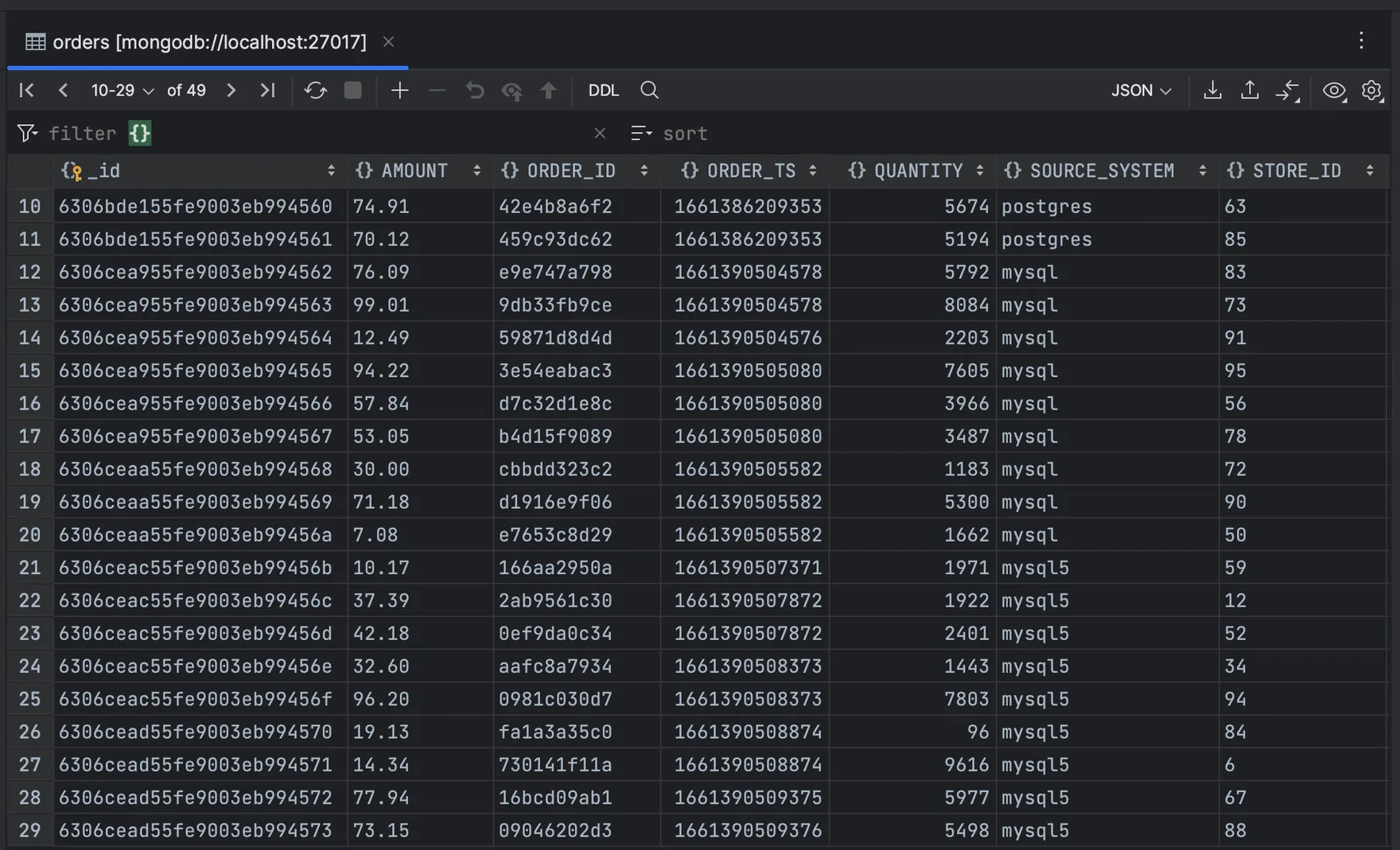
In this demonstration, the MongoDB Sink Connector properly handles the logical type, and data is stored correctly. The SchemaRecordConverter properly handles the conversion, but as you can see, the converter has to account for and handle logical types; it isn't done within the Connect API.
Data shown in MongoDB:
Elasticsearch
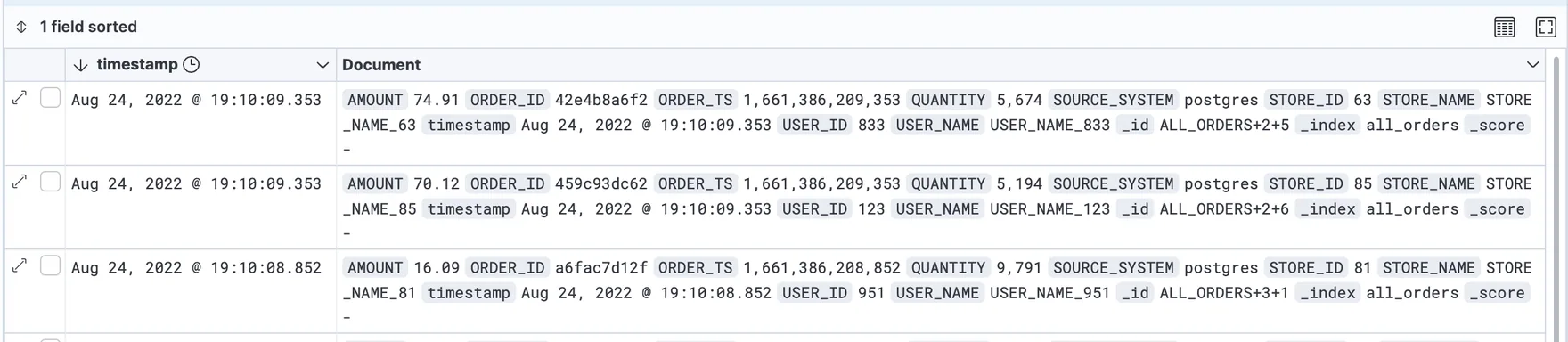
If Elasticsearch sink connector creates the index in elastic (schema.), logical types are handled properly. If the sink connector doesn’t create the index (schema.), logical converters aren't processed, and logical-type decimals end up as an array of bytes in Elasticsearch.
Index generated by the connector. In each record the amount is a decimal value.
Index is built manually through the Elasticsearch API (the connector doesn't create it). The decimal bytes are passed as-is to the index, yielding an undesired result. Each record is the byte array value (the physical representation of the logical type).
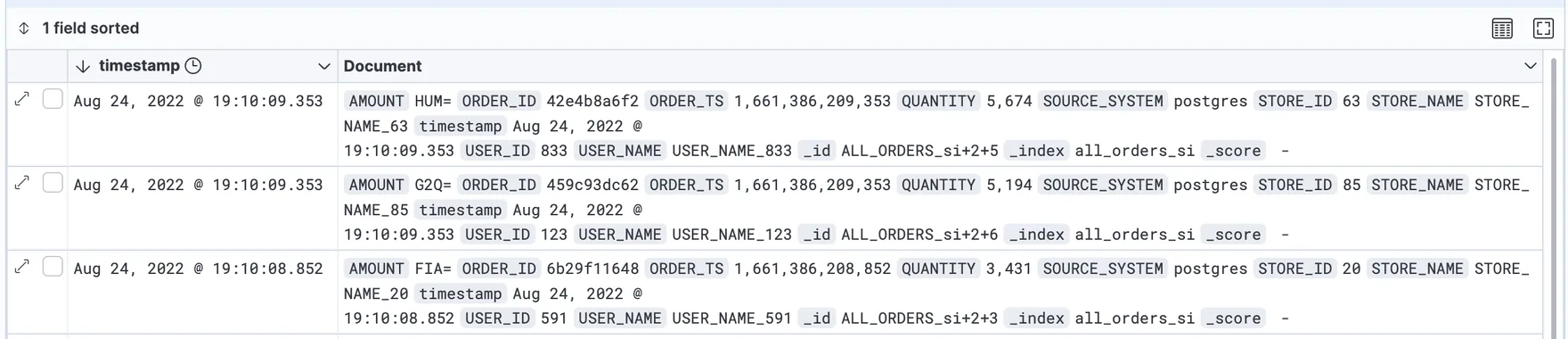
The amounts shown in the Kibana screenshot of HUM=, G2Q=, and FIA= are the physical byte arrays converted to strings.
Cassandra
The Datastax Cassandra Sink Connector doesn't handle the decimal logical-type correctly. Worse, the conversion only produces a warning in the Connect cluster log. No data is written, and the connector keeps running. When checking the log, you can see:
WARN Error decoding/mapping Kafka record ... : Codec not found for requested operation:[DECIMAL <-> java.nio.ByteBuffer] (com.datastax.oss.kafka.sink.CassandraSinkTask)Sink connector checklist
- Be sure to test with decimals, timestamps, and dates, unless they truly aren’t in your use case.
- Don’t simplify your POC. For example, don’t let the Elasticsearch sink connector create your indexes in your POC if that isn't possible in production.
- Watch the logs and check for
WARNor evenINFO. - If you have issues with logical types, you can have Debezium use strings for decimals (
decimal.), or you can use a stream processor (e.g. ksqlDB) to cast a decimal to a string.handling. mode=string
Takeaways
- Enabling database logging can be tricky, and each database has its own way of configuring and enabling it.
- Having an end-to-end proof of concept showcasing change data capture is a great way to get developer buy-in and involvement, but plan time to work with your database operations team to get it enabled in the enterprise.
- Use Apache Kafka’s Config Provider for secrets and environment-specific differences, such as the database connection string. Checking a single configuration artifact into revision control, without environment specifics, is a great benefit.
- Validate decimals, dates, and timestamps, as not all connectors handle them correctly.
- Check out the dev-local project and the
rdbms-demo in dev-local-demos. The specifics discussed here are based on that demonstration, and scripts are there to get you observing change data capture with Debezium and Kafka within minutes.cdc- nosql
Working on something like this?
Start a Conversation